
The problem
The lessons are taught by subject teachers, most of them not AI specialists, in their own subjects’ periods. School leaders needed to know which classes had been taught, who had finished and what students were actually learning – without asking anyone for a spreadsheet. And the students span every grade from Kindergarten to Grade 12, including Learning Support students still learning English.
What I built
- Interactive lessons for every week of every grade, each a lesson and a hands-on clinic or workshop, in four strands: How AI works, Design & build, Judgment, and Ethics & governance. Grade 6 sorts outputs into correct, incorrect and unclear; Grade 8 learns that accurate is not ethical in an ethics audit; Grade 10 locates the risk in an AI system and decides how to govern it.
- First-try scoring. Each activity keeps a student’s first answer and never overwrites it, so a score shows what the student knew, not how many tries it took. Time counts only while the lesson is open and active.
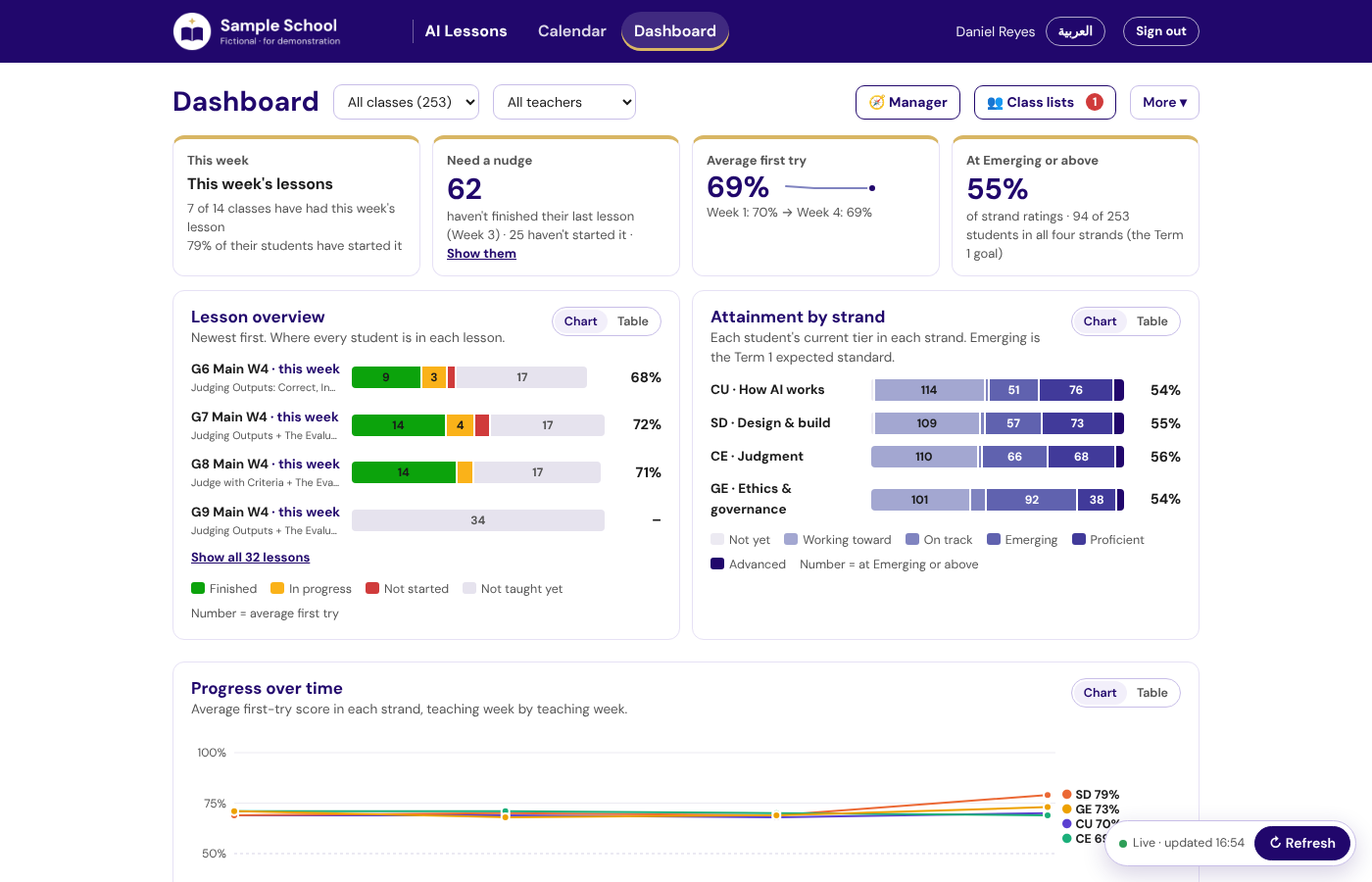
- Dashboards for four roles: teachers see their classes, school leaders every class, the AI lead (me) the manager view with reminders and awards, and students their own progress. A number always leads to names – “Need a nudge” lists who has not finished.
- The school calendar, built in. A lesson counts as not taught only once its period has passed, so no one is chased for a lesson that hasn’t happened; reminders go from my own Gmail as the AI lead, with no email service.
- Home languages. Every Main course week of Grades 6, 8, 9 and 10 in Russian, Korean, Japanese and Chinese: the words and diagram labels change, the activities and scores don’t.
Deciding what to measure
With the school’s leaders I settled on a few measures and defined each once, on the server, so every dashboard agrees: the average first-try score; the share of strand ratings at Emerging or above (the Term 1 expected standard); which classes have had this week’s lesson; and who needs a nudge. Every chart can be switched to a table, and color is never the only signal.
A leader can see in one screen what has been taught, who has finished and where students are – and every number leads to the students behind it.
Privacy and safety
Only school Google accounts get in, checked four times – by Google, at sign-up, by the server and by the database. A student can only read and write their own work; a teacher sees their own classes. The design was reviewed against ADEK’s School Digital Policy and the UAE’s data protection law; the code repository holds no student data and no secrets.
What changed
- 629 of the 639 students in Grades 6–12 have done at least one AI lesson on the site; 1,350 lessons have been started across 28 lessons.
- 21 staff have used the dashboards, on 112 staff-days, with nothing to fill in.
- On 22 October the whole app moved from Google Apps Script to a proper database without teachers noticing anything but speed – see Moving off spreadsheets.
What I’d do next
Review the strand results with teachers at the end of Term 1 and adjust the lessons that scored lowest; survey teachers on what helped and what got in the way (the method in the AI Pilot Evaluation); and extend the home-language versions to the grades that don’t have them yet.