Demonstration site. Every student, teacher, class and result in these samples is fictional, created to show how the tools work.
Portfolio · Samples
Dashboards and AI for a K–12 school, built and in daily use.
I design and build the tools teachers and leaders at the American International School in Abu Dhabi use every day: dashboards that turn assessment data into decisions, an AI literacy program for Grades 6–12, and the professional learning around them. Each sample is the tool's real code with a made-up school behind it – try anything you like.
Brandon A. Baki
Data & visualizationDashboards and briefings leaders act on: measures defined, sources reconciled, limits stated.
Learning technology & AIAI literacy for students, AI in planning and assessment, and AI tools judged on evidence.
Design & professional learningResources, workshops and self-paced modules that are clear, accessible and on brand.
Student AI literacy, lessons in a home language, professional learning on assessment in the age of AI, AI-made classroom activities and an AI tool pilot.
An AI lesson, from the student's seat to the dashboard
The same lesson, in a student's home language
Professional learning in teachers' own time
From an AI chat to a classroom activity
Piloting an AI tool before the whole school uses it
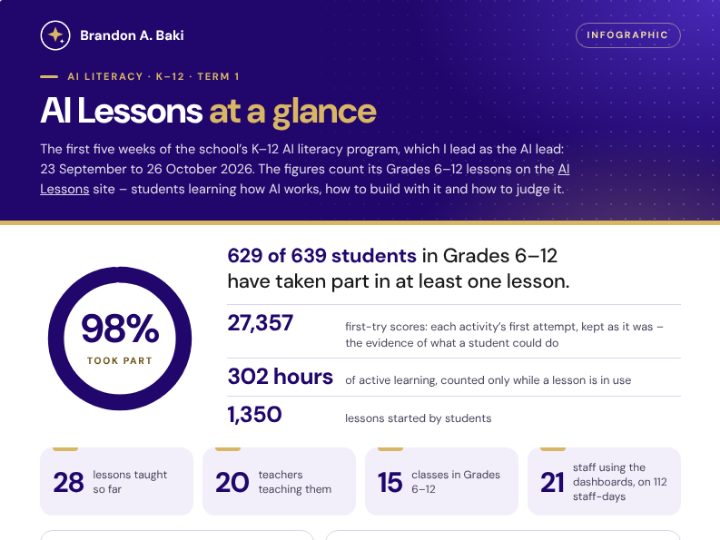
AI literacy lessons for Grades 6–12 – how AI works, building with it, judging it, using it ethically – and the dashboards teachers, school leaders and the AI lead use to follow every class: what has been taught, who finished, who needs a nudge.
Try: do a lesson as a student, then find it on her teacher's dashboard – or open a Grade 8 lesson in Korean or Russian.
Teachers paste HTML from any AI tool and get a classroom activity with its own link and QR code, saved to a shared library colleagues can search, filter and remix.
Try: open a simulation from the library – the projectile lab, Train a Tiny AI, Build an Atom – as a teacher and then as a student, then paste your own HTML and publish it.
Swaps student names for codes before a spreadsheet goes to an AI tool, then puts the names back into its answer.
Try: anonymize the made-up class list, then put the names back.
Responsible AI
Student privacy
Nothing leaves the browser
Open the sample
In development
What I’m building now
Tools I am shaping with school leaders, shown as early drafts – and how I would evaluate an AI tool before a school adopts it. Like everything here, they run on a made-up school.
A whole school’s assessment results in one place: MAP Growth, CAT4 reasoning and DIBELS early reading, with a briefing for leaders, growth by grade and class, the students who need support, and the actions agreed.
Try: bring in the files and reconcile them, turn on “Show the evidence” on the briefing, then switch “Viewing as” to a teacher.
An internal school review against the UAE School Inspection Framework: book and write up lesson observations on a tablet, log evidence, and watch the insights and the report take shape.
Try: start one of your lessons, write it up, then see it in Insights and the Report.
A full evaluation of an eight-week pilot of an AI tool – MagicSchool, with an invented school and teachers: a weighted rubric with privacy and security as gates, a before-and-after teacher survey, usage, evidence of student learning, and comments themed by AI and checked by a person.
Try: lower a privacy score on the Rubric and watch adoption stop, then change a comment’s theme and watch the AI–person agreement recalculate.
Pilot evaluation
Survey and rubric
AI checked by a person
Open the draft
Case studies
How the tools came about, and what they have done
The problem, the people, the design decisions, the rollout – and real totals from the live tools (counts only, never a student's data).
For teachers, leaders and parents – ready to print
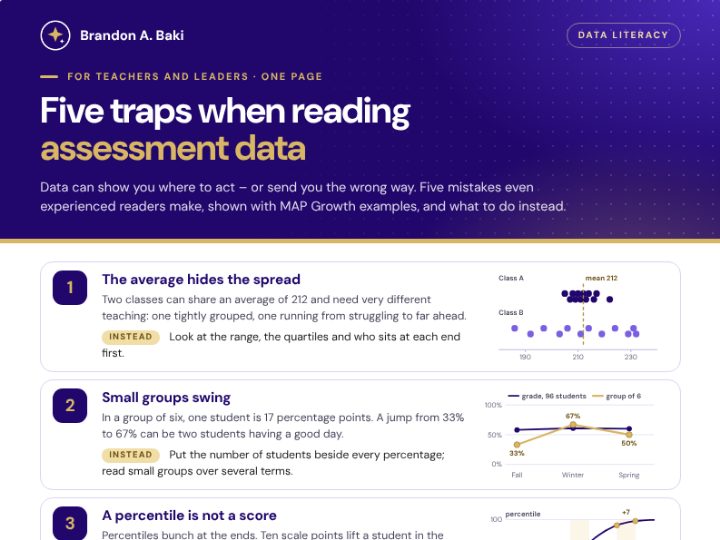
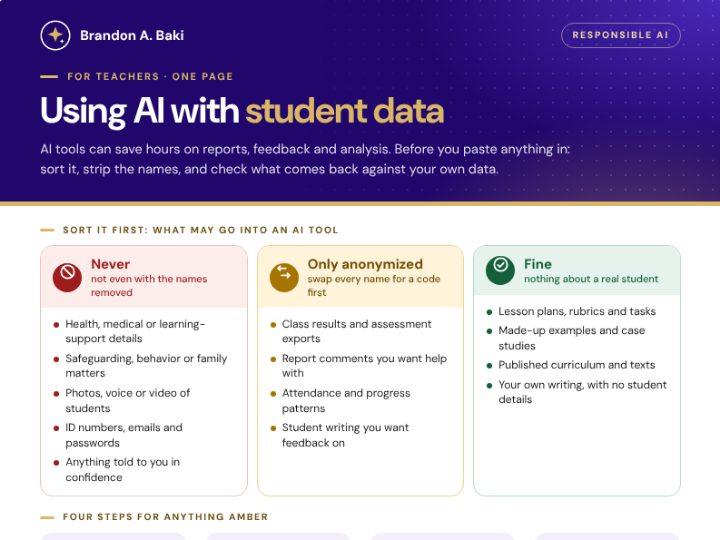
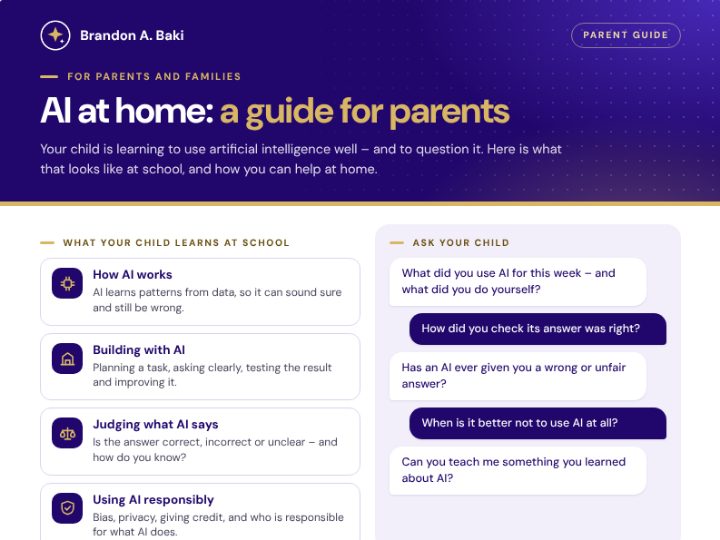
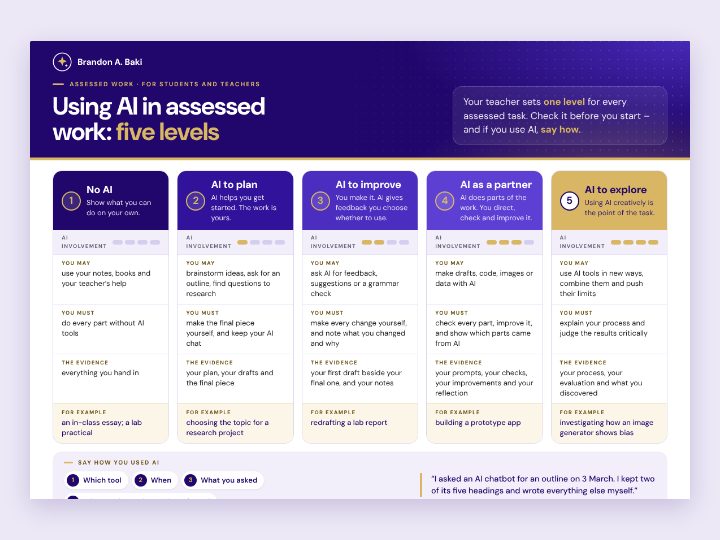
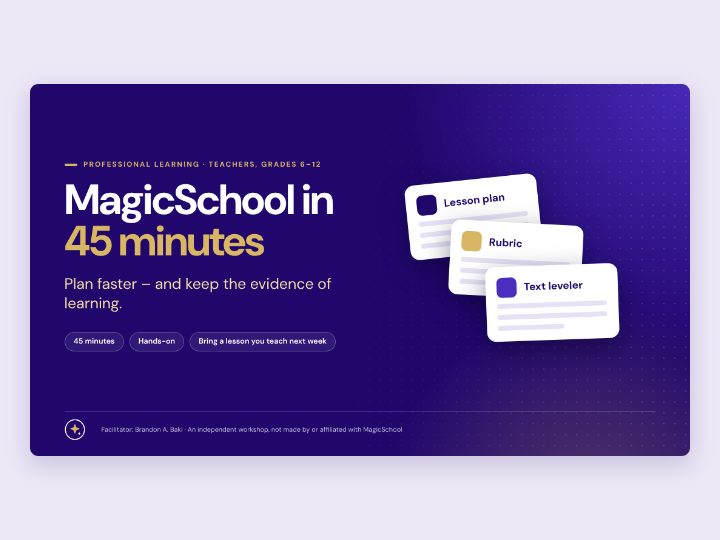
An infographic, guides, a poster and a workshop deck in the school’s brand: one idea per page, a clear hierarchy, accessible color, and print layouts that fit the paper.
Privacy by designOnly school accounts, checked at every layer; each role sees only its own classes; reviewed against ADEK's School Digital Policy and the UAE's data protection law.
Accessible by defaultEvery chart has a table; color is never the only signal; keyboard and screen-reader friendly; Arabic, and lessons in four home languages.
Built to lastAutomated tests on every change, the old and new versions checked side by side when a system moves, and documentation for whoever comes next.
AI-assisted, human-checkedI use AI for code, queries and drafting; nothing it produces reaches a teacher or a report without tests, a check against the source and my own review.
About
Brandon A. Baki
I work with the teachers and leaders of the American International School in Abu Dhabi to find what would make their work easier or their students' learning better – and then design, build, test and roll it out.
I'm applying for the K–12 Data Analytics & Visualization Specialist and K–12 Learning Technology & AI Specialist roles, and I'd be glad to walk you through any of it.